
The overall user experience (UX) your website provides is becoming increasingly important when it comes to both positive SEO rankings and customer conversions.
Google in particular has been quite vocal about this, so this is an area you definitely want to pay attention to.
In SEO terms, what does a positive user experience mean?
Your content addresses the searcher’s intent: they find what they’re looking for on your website after they click on your search result.
Your content provides value: you’ll want to find ways to do a better job than your competitors here to have a chance of ranking above them.
Your content is engaging: people who visit your page take some form of action after visiting. They don’t just least after viewing the page they landed on.
In addition, on a technical level your content should be:
Quick to load: the quicker the better. Google and other search engines have mentioned numerous times that page load speeds are considered an integral part of the user experience.
Mobile friendly: all text, images, menus and any other elements are easy to read, view and navigate through on mobile devices.
In this guide, we’ll talk about some of the main elements that you should pay attention to in order to deliver the best possible user experience.
While there are technical elements to this audit (which we’ll get into) a lot of what you’ll be looking at will be purely making sense of things.
Let’s get into it.
Matching Intent & Providing Ultimate Value
Whether you’re reviewing a landing page, article or otherwise, your content has to match the searcher’s intent.
In plain English, that means: following their search and a click on your search result, a user will (ideally) find content that answers their query in a high quality manner.
Let’s take a look at some examples:
- Noel Whittaker’s Age Pension Calculator: Noel does a great job of ranking for the keyword “age pension calculator”. Why? Because, he’s addressed the searcher’s query in a high quality manner.
Noel provides website visitors with a calculator that tells them when they will reach retirement. Nothing more and nothing less. - Red Points Brand Protection Software: Searcher’s looking for a brand protection software solution will find all their questions addressed on this landing page.
Brand Points has outlined: what their software is; its use cases, benefits and features; how it works; why potential customers should choose them, plus more.
Overall, a very high quality piece of content aiming to convince their target market to purchase their services. - Navigating the Regulatory Submission Process by DocShifter: Searchers looking for information on the “regulatory submission process” will be delighted after reading this piece.
A comprehensive piece, the article discusses what regulatory submissions are, types of submissions, the actual process, challenges, and more.
There’s even an accompanying video. No wonder this article is first on Google for its primary target keyword: “regulatory submission process”.
So, we’ve talked about both matching the searcher’s intent, but what about providing ultimate value?
Providing ultimate value means addressing your target market’s queries in a comprehensive manner (providing all possible relevant and useful information) and doing a better job than your competitors.
All of the examples above do that just that i.e., they are best in class when it comes to providing value.
In order for you to be first in this department, one of the things you need to do is to do a better job than your competitors when it comes to addressing the searcher’s query.
Optimised Content Layout
Alongside matching the searcher’s intent in a high quality manner, you need to deliver your content in a way that’s engaging and search engine friendly.
You should do this across all devices: desktop, mobile and tablets.
What we mean when we say optimising your content’s layout is paying attention to the order and style in which your content is delivered to your website visitors.
For example, when it comes to order then the most important information should come first.
In the case of a landing page, that would mean that the hero section should contain the following information:
- What you have to offer
- Why people should trust you
- The benefits your target market receives
- What action they should take next
If an article is in question, then you would want to address the searcher’s query directly as early as possible. Note: This is why you will often see articles with a definition of the topic at hand.
Beyond ordering your content in terms of importance, you should also ensure to keep information concise, avoid large blocks of text, break things up with headings, icons, images, videos and more.
In addition, you could break up sections of your web pages with contrasting background colours.
Here are some example websites which you can view on your desktop, mobile and tablet devices to get an insight into how they layout their content.
- Proof: Proof begins with their most important messaging first and presents it to the viewer before they even have a chance to scroll. From there they immediately present content to gain trust from their target market while also speaking about the benefits of their product.
- Petal: Similarly, Petal begins with their most important messaging and then moves to delivering content about the benefits and features of its products, along with why their target audience should believe them i.e., testimonials.
Just like Proof, the order in which Petal serves content to its target market is based on its importance (most to least) to both themselves as a business, as well as their target audience.
- Streak: Finally, and just like the two examples above, Streak begins with their most important messaging first coupled with some CTAs. They then move onto presenting the benefits and features of their product to their target audience.
All of the above examples are of landing pages i.e., pages designed to deliver sales. The same principles can be applied to other pieces of content as well, though.
Let’s take articles, for example. While they’re structure should be logical, you also want to present the most important information as early as possible. By doing so, you will be satisfying an important concept called time to value.
Page Speed
Search engines consider website speed as integral to the user’s experience, and thus reward faster sites with better search rankings.
We’ve already spoken about how to check your website’s speed in our article on performing a preliminary health check.
A quick reminder, you can use tools such as:
- PageSpeed Insights
- GT Metrix
- Pingdom Tools
So, we’ll speak more about what items you should pay attention to when analysing loading speeds on your website.
- Optimise images: Ensure appropriate image formats (e.g., JPEG for photographs, PNG for graphics) are used. Also ensure offscreen images are deferred until they are needed through lazy loading.
- Minified CSS, Javascript and HTML: This essentially means that the size of CSS, Javascript and HTML files are reduced to a minimum.
PageSpeed Insight will tell you if this is an area that you need to work on. If you do, you can hire a web dev, or if you prefer a cheaper alternative then plugins like WP Rocket for WordPress websites can help. - Reduced server response time: Again, one of three aforementioned tools will help you uncover whether or not you need to work on this area. In any case, utilising CDNs or perhaps even headless website development are two methods of improving server response time.
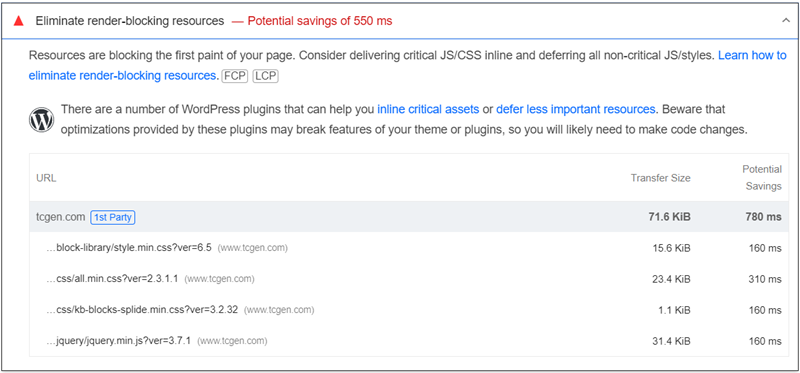
- Eliminate render blocking resources: As the name suggests, Identify what’s slowing down load times and have those items load asynchronously (i.e., lazy loading).
- Limit third-party cookies: Third-party scripts and services on your website can introduce overhead and slow down load times. Consider asynchronous loading or deferring non-essential scripts.
An additional question that’s worth asking is: what is your website’s loading speed like from different corners of the globe. To test that, you can use: https://tools.pingdom.com/
Are You Delivering The Right User Experience?
Contact us to see if how your website UX can have a positive impact on SEO
Mobile Friendliness
Finally, to deliver a positive user experience, you want to make sure that your website is mobile-friendly. That means ensuring your website has.
- Responsive Design: Your website seamlessly adapts to various screen sizes and orientations. This ensures that your content remains accessible and readable across all devices.
- Mobile-Friendly Navigation: Simplified navigation for mobile users by using a mobile-friendly menu structure, touch-friendly buttons, and intuitive gestures.
See whether your site utilises a hamburger menu or accordion-style navigation to save space and improve usability on smaller screens.
- Optimised Images and Media: Outside of ensuring image file sizing is optimized, also make sure that images are clearly visible on all devices. This may require that the same image be served twice; once for mobile and once for desktop devices.
For example, the mobile image could be portrait oriented and the desktop image could be landscape oriented. For mobile devices, you may even need to look into whether a single image should be broken up into multiple images.