

An effective keyword strategy will stem from intricate knowledge of your target market.
SEO is all about attracting potential customers (relevant website visitors), generating interest (leads) and closing sales (software signups) – and effective keyword targeting helps you succeed in those areas.
So when you perform your initial keyword strategy review, the first thing you will ask yourself for a particular keyword ~ or set of keywords is:
Is/are the keyword(s) I’m targeting relevant to my target market, and does it address their pain points, challenges and goals, or offer a solution to their problems?
Your website may or may not rank for many keywords. It all depends on the work that’s been done prior to your audit.
In this guide, we’ll cover both scenarios.
Before we get to the how-to section though, it’s important to speak about keywords themselves.
See what kind of keywords your site should be ranking for
Contact us for a keyword projection report. We’ll discuss the keywords you should be targeting to drive sales and growth for your SaaS brand.
Alignment: Keywords, Business Goals & Target Market
Like we mentioned at the beginning of this guide, a successful keyword strategy will stem from intricate knowledge of your target market.
Your keywords should:
- Address target market pain points, challenges, goals
- Provide solutions
- Be relevant to your business and product offering, as well as the problems you solve and the expertise you possess.
New websites usually won’t rank for too many keywords. Often, it will be just your brand name.
In such a scenario, the takeaway would be that you’re attracting traffic on the basis of your target market’s awareness of your brand.
That’s not necessarily a bad thing. At this stage though, you would have completed your initial keyword analysis, as there’s not much to report on.
Though, let’s say you are ranking for more than just branded terms, what conclusions can you draw? Let’s use a basic model of the purchase cycle to discuss.
Awareness: Problem recognition & education
All purchase cycles begin with your target audience recognising that they have a problem.
They may be trying to fix something very specific, or perhaps they don’t have enough knowledge in a particular field and want to educate themselves.
So, they may type in:
- How to report a fraudulent website?
- Product development process
- B2B sales funnel
These are known as top-of-funnel keywords and present an opportunity for you to generate brand awareness.
Consideration, intent & evaluation
After someone has educated themselves about their problem, they will often consider various solutions with the intent to purchase.
They’re not quite ready to buy yet, but they’re evaluating their options. Keywords targeting this area are known as middle-of-funnel keywords.
Keywords they may type as part of their search include:
- Top keyword research tools – to see what options are out there
- CRM tools comparison – to compare different CRM options
- SEMRush pricing – to see pricing options for a solution they think could work
In the examples above, we’ve listed them in such a way that the potential customer is going deeper down the sales funnel.
Often, inquiring about pricing is as close to a purchase as someone will get without yet the intention of buying anything or engaging your product.
Purchase
We all know what this means: your target audience member is about to become a customer. They want to take their credit card out and pay for your software.
Now, here are some quick examples of what they might type in.
- Buy ahrefs account
- Hubspot demo
- Salesforce free trial
The reality is though, that these sorts of keywords (bottom-of-funnel) are very low in search volume, particularly in B2B SaaS.
That’s not a reason to get discouraged from targeting them, though. These are very high value keywords, as the intent behind someone typing them is pretty clear.
Having said that, and this applies to B2B SaaS brands most: usually, you would have convinced your target market to hop on a call so that you can convince them to become a buyer.
Nevertheless, someone that’s come to your site via one of the bottom-of-funnel keywords we’ve just mentioned, is much more likely to become a customer.
Now that we’ve got a little bit of background, let’s get into reviewing keywords that you rank for.
How to Conduct a Keyword Strategy Review
Step 1: Keyword Extraction with Free and Paid Tools
Evaluating keywords you rank for at the time of audit will give you insight into a few areas, being:
- Main keywords currently driving traffic to your website
- Keywords you are ranking for just outside the top 10 search results (low hanging fruits)
- Keywords you are ranking for, albeit quite poorly (those that you need to work on improving)
Overall, the objective of your initial review is to see what your current position is with regard to visibility in your market.
Doing so will help you uncover low-hanging fruits i.e., those keywords that you can generate some traffic from quickest. As SEO is a long game, this will naturally be in your best interest.
You may also discover that you’re ranking for irrelevant keywords, or keywords that aren’t going to generate results for your business – and analysing very early on will allow you make sure that your focus is in the right place on time.
To perform an initial analysis, we recommend you use either Google Search Console (free), or Ahrefs / SEMRush (paid).
We’ll first discuss how to extract the keywords that your site ranks for.
Google Search Console
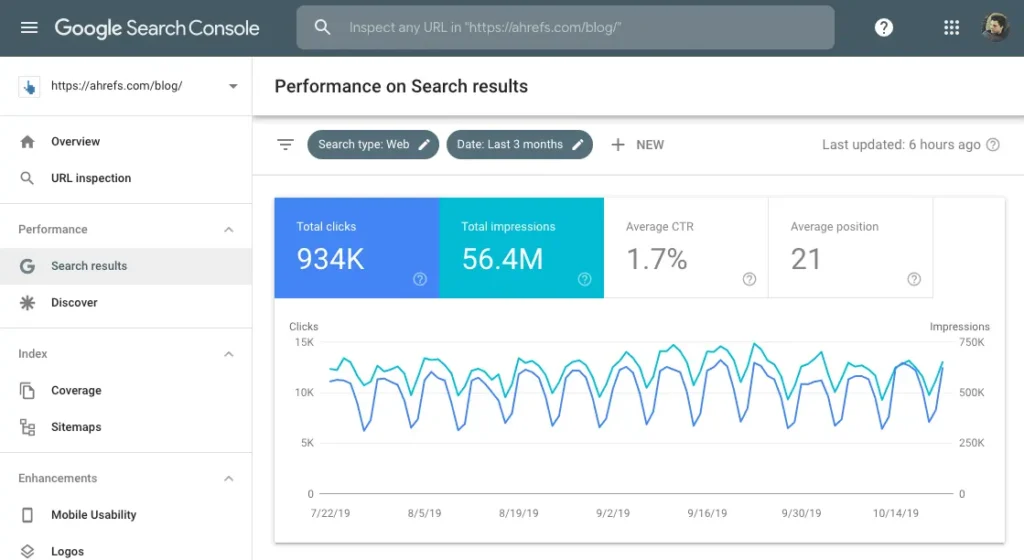
To view which keywords you rank for in GSC. Enter your account and then click on “Search Results” in the left-hand sidebar.
You should see a screen like the screenshot below appear. Right underneath, you will be able to see all of the keywords that you rank for.
Ahrefs
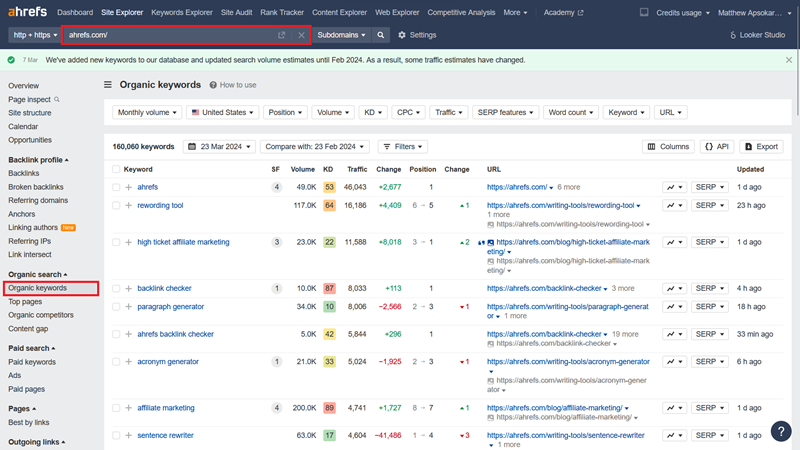
To see which keywords you rank for via Ahrefs, simply type your URL into the text box located at the top of the screen (we’ve highlighted it below).
Next, click on “Organic Keywords” in the left-hand sidebar area.
SEMRush
To see which keywords you rank for in SEMRush, type your URL into the search bar > click “Organic Research” > and click “Positions”.
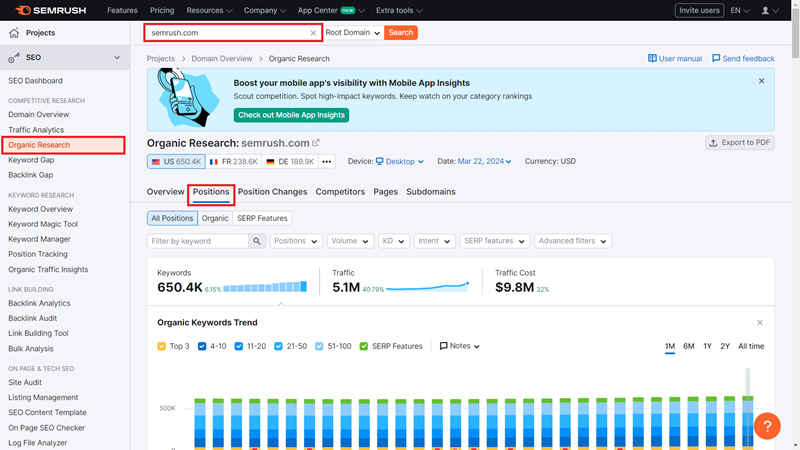
All three options above allow you to export the keywords you’ve entered, so that you can then view them via a spreadsheet.
Step 2: Organization with Google Sheets
Once you’ve extracted the keywords you rank for, you want to organise them into one or multiple sheets. We usually use Google Sheets for this activity.
You’ll want for your sheet(s) to be clearly organised. Here are the columns we usually use when conducting an initial keyword analysis.
- Keyword: This will be the keyword itself. As you perform your review, you’ll often find your website ranking for different variations of what seems like the same keyword. It’s enough to enter just one variation at this early stage.
- Difficulty: Tools like SEMRush and Ahrefs will often give you this sort of data while GSC won’t. “Keyword Difficulty” gives you a number from 0 to 100 in order to tell you how hard it is to rank for a keyword. For example, the keyword “SaaS SEO agency” has a difficulty of 31.
- Search Volume: This refers to how many people per month search enter the phrase into search engines. If you’re targeting a global audience, then make sure to pull out global figures here.
- Page URL: In this column, you should include the URL which ranks for the keyword you’re analysing.
- Relevance: Finally, how relevant is the keyword to your business, products/solutions you offer, and problems you solve? Is someone who types this sort of a keyword in someone you would consider as part of your target market?
It’s useful to use a scale here – from 1 (less relevant) to 5 (more relevant). - Funnel stage: Here you will manually type in which stage of the sales funnel you think they keyword belongs to i.e., top, middle or bottom.
- Notes: Finally, if there are some notes you’d like to write regarding each keyword, then dedicating one more column to do just that isn’t hurtful.
Not sure of how to set up a keyword analysis spreadsheet?
Get one sent directly to your email for free!
Step 3: Analysis & Note Taking
Now that you’ve collected and organised all your information, it’s time to analyse and make sense of it all.
At this stage, it will be useful to create a new Google Sheet or any other or Spreadsheet file in order to further organise your keywords.
During this stage, your aim is to make sense of your current position in terms of keyword rankings. So here are some ways in which you’ll want to organise your keywords.
- Keywords you’re currently ranking in the top 10
- Keywords for which you’re currently ranking just outside of the top 10 i.e., positions 11 to 20
Also, you should include highly relevant keywords here i.e., those with a relevance score of 3 or more - Pages that currently have average keyword rankings in the top 10
- Pages that currently have average keyword rankings just outside of the top 10
- Irrelevant keywords that you are ranking for
In addition, you should analyse whether you have the right type of content ranking for each keyword you analyse, as this is vital.
Once you have all of this information, you can begin to take down notes – perhaps in a Google Doc.
These notes should contain information on the keywords you should focus on, those from which you can draw some quick wins, and those which you should not focus on.
Re-cap: Reviewing current keywords sets the stage for future success
By analysing keywords that you’re currently ranking for, you will get an overview of your website’s current position, recognise opportunities for improvement, and you will also see your SEO campaign begin to take shape.
Take your time at this stage of , as effective keyword targeting is where all successful SEO strategies begin. This can be a complicated area if you’re not adept at SEO. Feel free to contact us if this is an area you find yourself getting lost.
Here, we’re being told that “robots” i.e., the robots.txt file is blocking search engines from crawling and indexing the page. We can see where it says “noindex”.
At this stage, you would need to return to the robots.txt file to check if there is a disallow tag associated with the URL, and then check whether you want the URL to be indexed or not.