
Analysing your backlink profile will tell you about both the quality and quantity of links pointing to your website.
Backlink analysis has changed over recent years, and particularly ever since Google has come out to say that poor backlinks are now ignored instead of punished.
What this means is that you can place your entire focus on uncovering additional linking opportunities, and that you don’t need to worry about cleaning up toxic links.
When you perform a backlink analysis, you should focus on two main areas, being:
- Getting an overview of your current link profile through an initial analysis
- Finding additional link building opportunities
In this guide, we’ll cover both areas. We’re going to talk about why you should pay attention to each, how you can analyse the aforementioned areas, and what you can do with the information you’ve collected.
Let’s get into it.
Initial Backlink Analysis
Analysing your website’s backlink profile is a crucial aspect of off-page SEO. It provides insights into your site’s authority within your industry, trustworthiness, and overall link profile.
The quality of your backlink profile is determined by the following items (from most to least important):
- Relevance: Links from other websites within your industry will carry the most weight. So, if your SaaS is a project management tool, then links from the project management niche will be most valuable to you.
The relevance of a website providing a link to yours is the single most important factor when assessing link quality, and by quite some margin. - Domain authority: This is a score on a scale of 100. Tools like Ahrefs and SEMRush give their metrics different names like Domain Rating and Authority Score. In any case, the higher the authority score, the better.
It is important to note though, that relevance far outweighs domain authority (or any other factor), when it comes to link quality. Typically, it’s better to have a lower authority but higher relevance link than a higher authority link with little-to-no relevance. - Anchor text: Usually, anchor texts provide context about what information a website visitor can expect to find if they click on a link. In addition, they provide context to search engines as to what kind of keywords the page being linked to should rank for.
Anchor texts should be relevant to the page to which they are pointing. Also, not all anchor texts leading to one particular page need to be the same. It’s good to have some variety of similar, relevant, but slightly different anchor texts. - Link diversity: Not all links should come from one website. Though, having said that, having multiple links from a single source can only be beneficial. Nevertheless, you should aim to have many relevant websites with backlinks pointing to yours.
- Link placement: Typically, links within the main content area (body) tend to carry more weight than those in sidebars, footers, or author bylines.
How to Analyse:
It’s important to note that there are many ways in which you could perform a link analysis, so we’ll show you how to perform a basic link analysis of a single page.
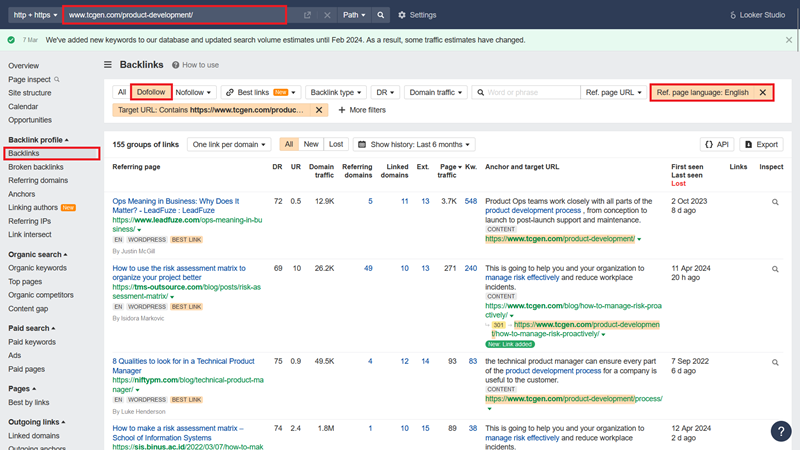
- Use your favourite SEO tool e.g. Ahrefs, SEMRush or something else. We’ll work with Ahrefs here.
- Enter the URL that you want to analyse and then click on Backlinks on the left-hand sidebar area
- Select “Dofollow” and “English” as the language
- Click on Export
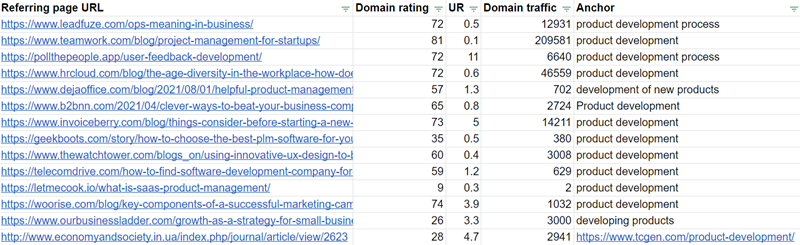
- Delete all columns except for the following:
- Referring page URL
- Domain rating
- UR
- Domain traffic
- Anchor
What to do with this information
With this basic analysis, you will now have an overview of all the links pointing to your website, including:
- Where links are coming from: to ensure relevance
- The website’s authority: to ensure that search engines will give weight to the link
- Anchor text: to make sure that it’s relevant to the page being linked to
Some further steps you could take after performing such as basic analysis include:
- To contact linking websites to see if there is further opportunity to collaborate
- To ask linking website to correct anchor texts if you find they are not relevant to the page they’re linking to
As we mentioned in the beginning of this guide, our stance is that backlink analysis should be all about discovering additional opportunities. Particularly as Google is no longer punishing websites with toxic links.
So how can you find additional backlink opportunities via analysis? Let’s get into it.
Are You Delivering The Right User Experience?
Contact us to see if how your website UX can have a positive impact on SEO
Finding New Backlink Opportunities
There are three main types of websites that you can seek additional links from. They are:
- Partner websites
- Brand mentions
- Sites with links to informative pieces
Sites that mention you as a partner
You’ll already know what partner and associate websites are. Usually, they’ll link to you by placing your logo somewhere on their site – usually the ‘Partners’ page.
Partner and associate websites represent the easiest way to get additional backlinks. The best part is that these websites are often within your industry, which is a huge plus.
So, how do you identify links from partner websites?
Firstly, you should already be aware of who all your partners are, and you can just visit their sites manually.
But, you may have too many partners to look into, or you may not be aware of them all. So, continue reading.
How to find them:
We’re going to work with Ahrefs again.
- Enter your website URL
- Click backlinks in the left-hand sidebar area
- Once the new page loads, select:
- Dofollow
- Backlink type: Image in anchor
- Target URL: is [your homepage]
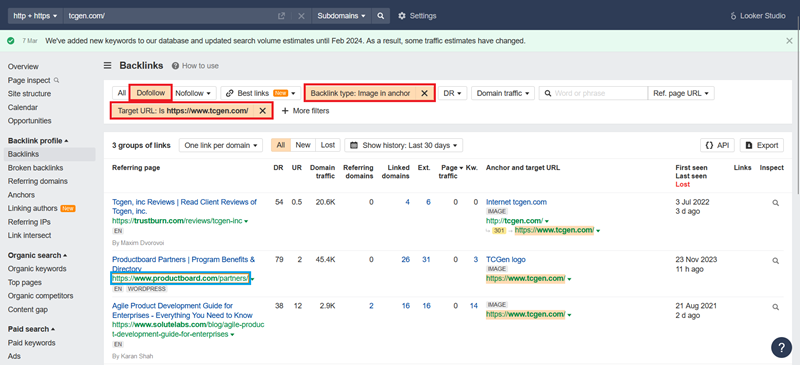
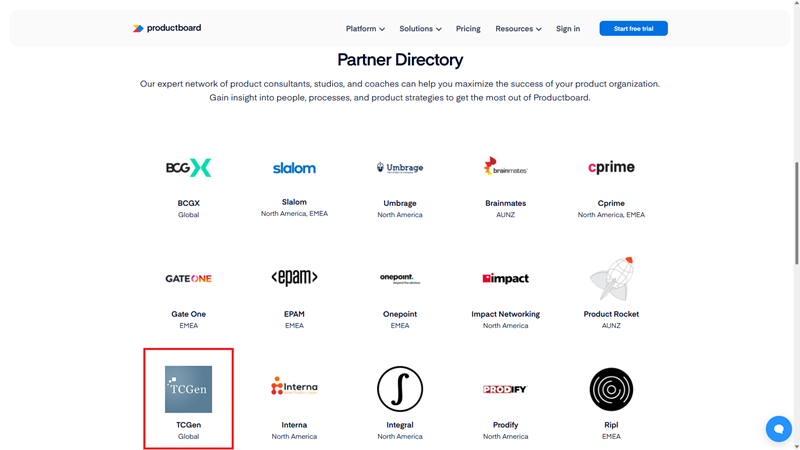
As you can see below, ProductBoard has mentioned TCGen as a partner in their Partner Directory.
What to do with opportunities you find:
In this sort of a case, you may contact your partners directly to see what kind of value you can exchange. For example, you could:
- Write articles for your partners, which resonate with their target audience
- Allow partner websites to host content that belongs to you and share it with their target audience
- Allow partner websites to copy/paste relevant articles of yours to their own website
In exchange, you would ask for an additional link to your website.
As we mentioned above, you will find that this is one of the easiest ways of scoring additional backlinks.
Sites that mention your brand name:
How to find them:
Ahrefs: Write a quick how-to guide. Include steps on exporting.
- Enter your URL
- Click Backlinks in the left-hand sidebar area
- Select “Dofollow”
- Select “Anchor” and enter your business name
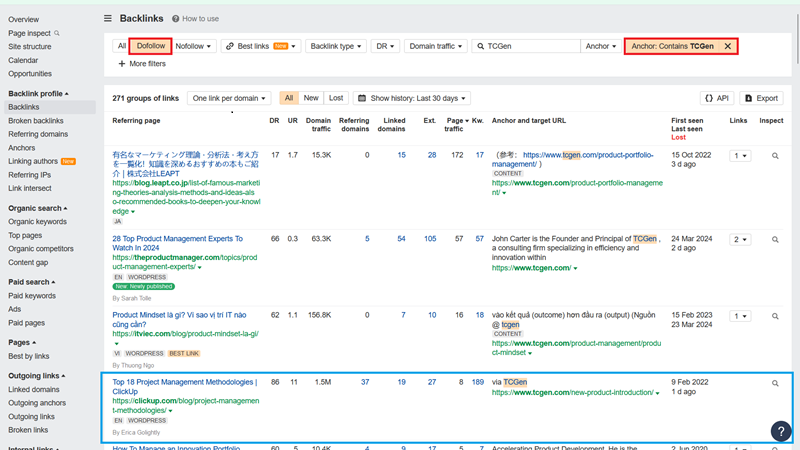
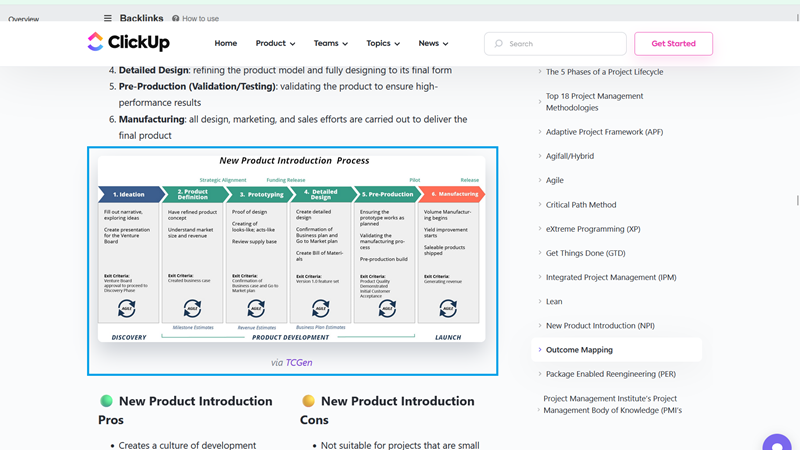
As you can see, Clickup has taken an image from TCGen’s website and then used it on their own. They mentioned TCGen immediately below to give them credit for the image.
What to do with opportunities you find:
If you find that someone has mentioned your brand name, especially if they’ve used a resource of yours then you will want to reach out with a friendly message.
Your goal should be to explore additional ways in which your resources could be beneficial to the website already linking to you.
So, once you’ve analysed all the opportunities you’ve found, and filtered out those that aren’t relevant. Keep a spreadsheet of relevant opportunities to refer to later when you begin implementing your link building strategy.
Sites that link to informative pages on your website:
It’s very commonplace for SaaS websites to link to useful resources from other SaaS websites. Why? Often, an author may make reference to something that requires explanation.
Instead of explaining an entirely new topic within their existing article, it’s much easier for authors to simply find reliable sources on the web, and point to their explanations instead.
For example, you’ll notice we never explained what backlinks are. Instead, we placed a link to an article SEMRush has written about backlinks at the beginning of this guide.
We did this so that we can focus on telling you how to analyse them.
So, how do you find websites that have placed links to resources on your website?
How to find them:
This is very much a repeat of performing a basic backlink analysis with an additional step.
- Enter your website URL
- Click on Backlinks in the left-hand sidebar area
- Select “Dofollow”
- Select “Backlink type: in content”
- Click Export
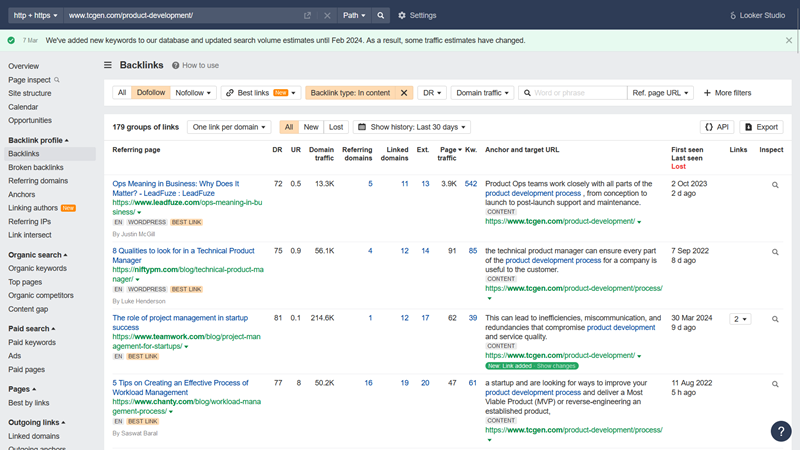
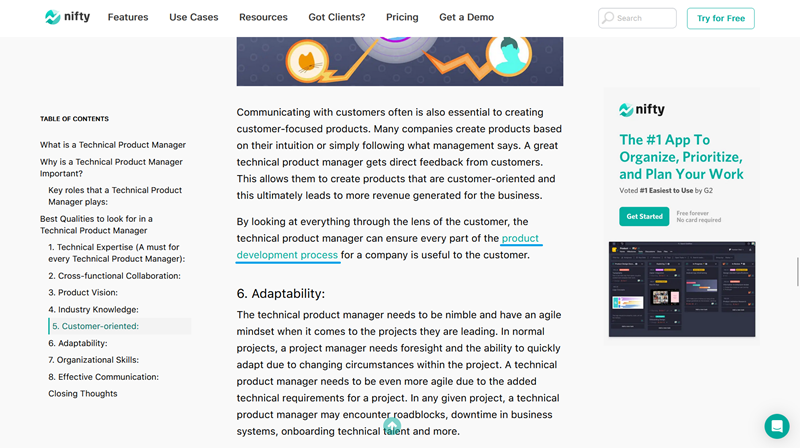
Below you can see how in their article on Technical Product Managers, NiftyPM has linked to TCGen’s Product Development Process article.
What to do with opportunities you find:
In the example above, we can see that NiftyPM has shown an appreciation for the expertise that TCGen has with regard to the Product Development Process.
If you find yourself in a similar scenario, you can reach out and explore other, related areas in which your expertise might be useful to link to as well.
Overall, what you want to do while you’re still analysing your website is to filter out the irrelevant opportunities and keep them for later.
Re-cap: Analyse your links to uncover opportunities for faster growth
Performing a backlink analysis as you audit your SaaS website is a great way to find quick wins. It will complement your on-site SEO efforts, particularly if you’re trying to grow your online presence.
While evaluating your overall position is a great starting point, much of your analysis should focus on finding additional linking opportunities, including from:
- Partner websites
- Websites that mention your brand name
- Relevant websites that link to informative sources on your own
You’ll have a great starting point from which you can formulate your link building strategy going forward. That means: hitting the ground running when your SEO campaign kicks off and gaining traction as quickly as possible.