
A good website structure allows both your customers and search engines to easily find their way around your site.
Obviously, the easier it is to get around, the better the user experience. Thus, search engines will look at your website more favorably.
Here are the basic components of a good website structure:
- It’s logical: Think of your website as you do folders on your computer. Hopefully, they’re well organized in a logical manner. If they are, finding what you need is easier.
- Click depth is low: The number of clicks it takes for a user to navigate from the homepage (or another starting point).
- Extensive internal linking: This aim’s to help customers navigate directly between related pages. It also explains to search engines how pages are interconnected within your site.
- Efficient content organization: Content should be logically grouped and labeled, making it easy for users to find relevant information.
We’ll go into further detail for each section below.
Website Architecture
Here’s a look into how good website architecture looks. Click on the link below. You will see how Super Guide has organized all their informative content on their website.
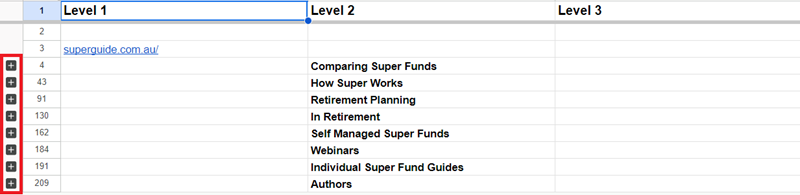
If you navigate through the Google Sheet, you will see that everything is grouped.
For example, all articles talking about Self Managed Super Funds are in one group, and all articles discussing Retirement Planning are in their own group as well.
This makes for a positive user experience, as your website visitors (and search engines) will easily be able to find what they’re looking for.
So, how do you check your website’s structure?
How to check:
- Open Screaming Frog
- Enter Your URL in the URL Bar at the top and click on “Scan”
Select “Tree Table View”
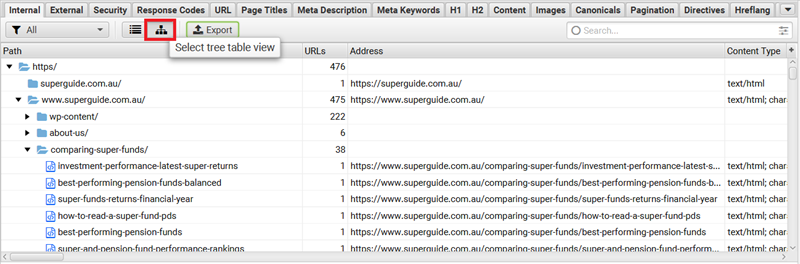
- Additional step: export your website structure to a spreadsheet
An additional step we usually take is to note which primary keyword each page is trying to rank for, as well as the intent of the page (sales, lead magnet, article, etc.).
This will be a useful reference point for when you are performing audits of individual pages as your SEO audit continues.
See what kind of keywords your site should be ranking for
Contact us for a keyword projection report. We’ll discuss the keywords you should be targeting to drive sales and growth for your SaaS brand.
Click Depth
Click depth is the number of clicks (go figure) it takes a website visitor to get from a landing page to another (desired) page.
In the SEO world, this is the number of clicks it takes for a website visitor to get from your search result to a specific page e.g., a signup page.
For example, if someone types in a search term such as “CRM software” and then clicks on a button that takes them to a Sign Up page, then that would be counted as a click depth of 1.
If, on the other hand, they typed in a search term and landed on your CRM software page, clicked through to another page – for example, an article – clicked a lead magnet, and then clicked through to a Sign Up page then that would be considered a click depth of 4.
Generally speaking, a lower click depth is better. Imagine you have a page via which website visitors usually convert. Would you rather they took 0 – 1 or 4 – 5 clicks to get there?
By now, you doubt understand why Click Depth is important. A “shallower” click depth makes your website visitor’s life easier.
As always, Google will reward your efforts to create a positive user experience. Thus, analyzing your click depth to find areas for improvement is always important.
How to check:
To check the click depth of specific URLs on your website, you can use one of the following methods:
- Inspect manually: This method is as simple as it sounds, but maybe a bit time consuming. If you have a small website, then this may be the best way forward for you.
Because we’re interested in organic search, begin by entering a search term that you rank well for. Then, see how many clicks it takes you to get from that page to a page via which you’d like for your visitors to convert.
The number of clicks it takes is the click depth of that conversion page. - Use a website crawler: We like to use Screaming Frog, and are particular fans of its ability to you your website through its “Tree Table View”.
Nevertheless, not only can the software give you an overview of your website structure, but also of the click depth of individual pages.
Go Fish Digital has written a great guide about exactly how to do this. So, we’ll link you to it instead of regurgitating what they’ve said.
Use Google Analytics:
We obviously know that Google is phenomenal at providing insights on your website. Unsurprisingly it can also tell you about the paths users take to navigate through your site.
While it may not provide click depth specifically, you can analyze the behavior flow report to understand how users move from one page to another.
For example, if there is a page via which your website visitors usually perform some sort of conversion action, you can track how many clicks it typically takes for them to get to that page.
One thing you should remember to do is to filter your audience to organic only.
Internal Linking
Internal linking simply means creating a connection between two pages on your website using a hyperlink. The purpose of an internal link is to provide a direct way of navigating to related content for website visitors.
Ultimately, this improves the user experience, and is seen as a good thing by Google. Thus, good internal linking practices will be rewarded.
Outside of providing a positive user experience, employing sound internal link building practices will also aid with webpage discoverability and indexing.
So overall, there are quite a few reasons why getting it right is in your interest.
How to check:
Below, we’ve outlined three different ways in which you can check internal links on your website. There are more ways to do this, but the methods we’ve suggested are most practical.
- Screaming Frog: Once you’ve installed this tool and entered your website’s URL, click on the URL you wish to inspect and navigate to the “Inlinks” tab. You will be able to see a complete list of links pointing to the page you’re currently looking at from within your own website.
- Manually Reviewing Your Website: The next method we’re going to suggest is better suited to smaller websites. Head to your website, navigate to the page you want to inspect, and right click and open a new page on any internal links you see. Take note of where the internal link is pointing to, as well as the anchor text being used.
- Using Browser Extensions: Finally, there are a plethora of SEO tools available which can do the work on a page-by-page basis for you. For example, you can download Check My Links, a browser extension for Google Chrome. This extension will scan the page you’re currently visiting and will highlight all links. Valid links will be highlighted in green, while broken links will be highlighted in red.
You will see in both cases above that SEMRush has said that the page being viewed is the preferred URL. If they had a better guide on instagram marketing, and this was a more condensed version, then they could have put the other URL here instead.
Content Organization
Making sure your content is organized and grouped logically is important, well, because it makes things easier for your website visitors.
Some ways in which you can make sure that you’re on top of your content organization include to create content clusters, as well as to organize content according to search intent. We’ll get into each below:
Creating Content Clusters
A content cluster allows for your website visitors to view all related content in one place, kind of like they would in a public library.
The best way to check if you have created logical content clusters is manually. A content cluster will usually have a “hub” page, from which it will link to all other relevant content.
Organizing by Intent
The other way in which you can organize your content is in accordance with search intent, and the stage of the sales funnel to which the content belongs.
For example, sales-oriented landing pages should be grouped together with other similar pages. This way, if someone is relatively purchase ready, and is browsing a particular software solution you offer, it will be easy for them to navigate to other, related solutions as well.
On the other hand, informative content pieces which aim to target customer profiles at the top of the sales funnel should also be grouped together. This way, it’s easiest for your target market to easily gain access to your expertise, as it’s located in the same area of your website.
Re-cap: Deeper level technical assessment
A thorough technical SEO assessment is crucial for ensuring the optimal performance and search engine visibility of your website.
By meticulously examining sitemaps, URL structures, canonicalization, and server response codes, you can identify and rectify issues that may be hindering your site’s ability to rank well in search results.
Implementing these best practices not only enhances your website’s SEO but also improves user experience, consolidates link equity, and ensures that your content is easily accessible and properly indexed by search engines.
Re-cap:
A logical website structure will ensure that website visitors can easily find their way around, making for a great user experience.
In addition, you will be helping search engines find their way around your website as well, allowing them to present your pages to your target market as quickly as possible via search results.
To ensure review your website structure, check out the following areas:
- Website architecture
- Click depth
- Internal linking
- Content organization
A sound website structure will set the foundation for effective targeting of your ideal customer via SEO.